Mirror Mode
Mirror Mode reflects your strokes as you paint them. Draw once and the symmetry keeps up with you, live, at full brush quality.
Turning it on
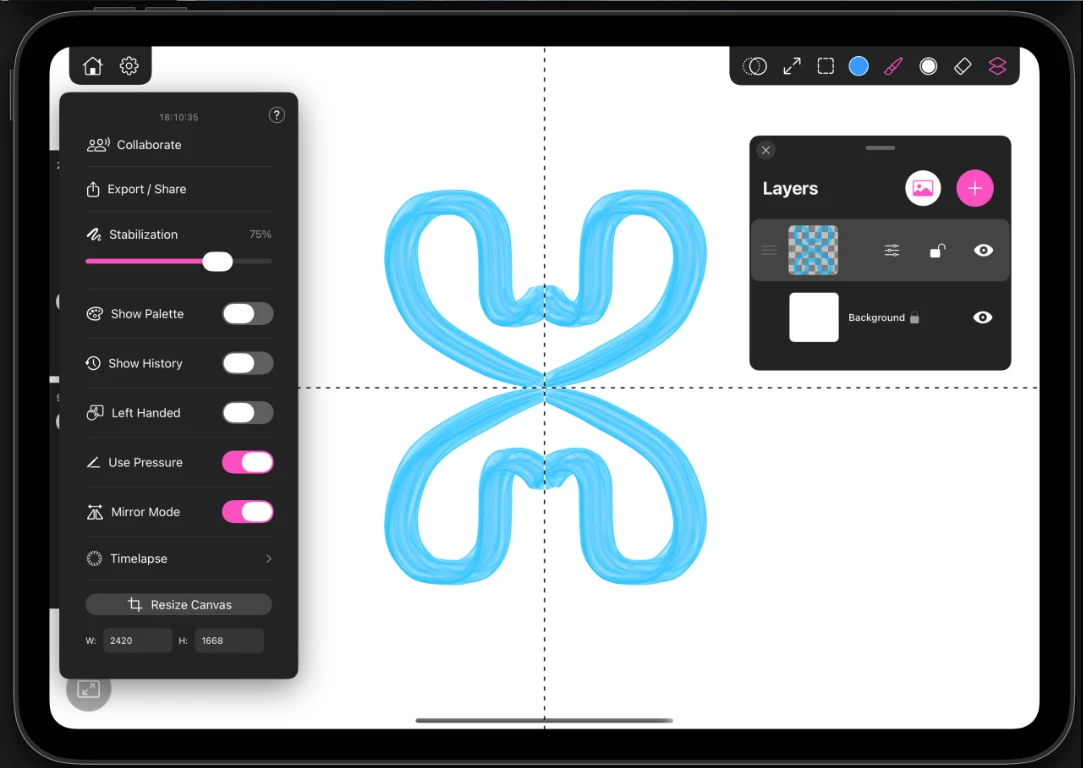
Open the gear menu and switch on Mirror Mode. A picker appears so you can choose the axis. The setting belongs to the active layer, so you can have a mirrored layer and a freehand layer in the same painting.
The axes
| Axis | Result |
|---|---|
| Vertical split | Reflects left to right across a vertical line |
| Horizontal split | Reflects top to bottom across a horizontal line |
| Quadrant | Reflects into all four quarters at once |
| Radial 8 | Repeats your stroke around the center eight times |
| Radial 12 | The same, twelve times |
What it is good for
- Vertical split for faces, characters, vehicles and anything with a left and a right that should match.
- Quadrant for tiles, ornament and repeating decorative panels.
- Radial for mandalas, snowflakes, rosettes and kaleidoscope work. Twelve segments turn even a careless scribble into something that reads as designed.
Quick Shapes works under mirror mode too, so you can snap a clean arc and have it repeat around the center.
Tip
Turn mirror mode off once the symmetric structure is in place, then paint the asymmetric details by hand.